Digital printing for software manuals
Digital printing is an excellent method for supplying printed software documentation.
Volume
Many software companies supply one major release each year and have many minor releases in that time. With digital printing, print runs of only tens or hundreds of copies are practical.
Delivery time
Digital presses are slower than litho presses. For print runs of only a few hundred copies, this is not a problem. For small print runs, the delivery time for digital printing is faster than the delivery time for litho printing, because the setup time is less. For example, TechScribe sends a press-quality PDF file by e-mail to our preferred printing supplier. After two days, the documents are available for collection.
Cost
Litho printing has a high setup cost, but digital printing has a low setup cost. The toners that are used in digital presses are more expensive than printing inks. However, the page cost is less for litho printing than for digital printing.
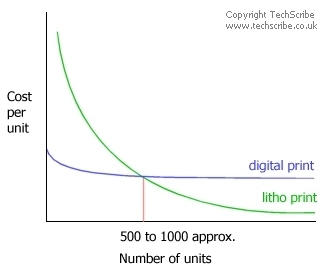 Usually, for short print runs (less than approximately 500 copies), digital printing is cheaper than litho printing. When you want only a few copies, digital printing is the only economically practical method, if you want a professionally printed document.
What are the costs? Typically, for 20 documents, 100 sides, colour, A4, wire bound with front and back covers, expect to pay £10 to £12 a unit.
Print quality
Litho printing is better in quality than digital printing, but digital printing has excellent quality output. Digitally printed documentation from a commercial printer is always better than the output from an office printer. However, digital printing has these problems:
- Toner that is used in digital printing has a shiny appearance on the page. Usually, the shiny appearance is only seen clearly on large areas of colour. Usually, the shiny appearance is not a problem with text.
- In theory, with the Pantone system, colours can be matched accurately. However, in practice, colours cannot be matched accurately. For the best colour reproduction, use litho technology.
File formats
Most digital printing companies accept PDF files.
Create the software documentation with your preferred tool. Then, create a print-quality PDF file, not a PDF file that is optimized for viewing on the Internet. Send the print-quality PDF file to your printing supplier.
Suppliers of digital printing
TechScribe does not offer a digital printing service. (If you buy our software documentation services, we can manage the printing and binding for you as part of the service.)
We recommend Mensa Printers (www.mensaprinters.com) for your software documentation printing.
See also 
 RSS feed